
Last Updated: October 26, 2026
Quick Summary
You visualise a custom jewellery design by moving from inspiration and sketches to 3D CAD renders that show accurate metal colours, stone settings and textures from multiple angles. Most jewellers include two or three revision rounds, and you approve the design before any metal is worked.
- 65% of consumers prefer personalised jewellery when choosing a gift, and 45% will pay more for it.
- Ask for renders from four angles: top view, side profile, three-quarter view and on a modelled hand.
- 3D CAD renders are included or cost a modest fee commonly in the £50-£250 range depending on complexity.
- Use AR try-on apps to shortlist shapes before your consultation, not to approve a design.
- Confirm ring size, metal, stones, band width in millimetres and total price on a design brief before sign-off.
Table of Contents
- Why Visualising a Custom Jewellery Design Matters Before You Commit
- Step 1: Gather Custom Ring Design Ideas and Inspiration
- Step 2: Build a Mood Board and Start Jewellery Design Sketches
- Step 3: Turn Sketches into 3D Renders with 3D Jewellery Design Software
- Step 4: Complete a Jewellery Design Brief Template Before Sign-Off
- AR, VR and DIY Tools: What Each Visualisation Method Costs You
- Book a Visualisation Consultation at Morgan Banks
- Frequently Asked Questions
Why Visualising a Custom Jewellery Design Matters Before You Commit
Most people cannot picture a finished ring from a drawing. That gap between what you imagine and what gets made is where disappointment starts. The fix is simple: see the design before anyone touches metal.
The stakes are higher than they look. According to Washington Diamond's consumer preference survey, 65% of consumers prefer personalised jewellery when choosing a gift, and 45% will pay more for it. Yet the 'sight-unseen' gamble is real: without a 3D mockup, the finished piece may not match your mental image at all.
Step 1: Gather Custom Ring Design Ideas and Inspiration
Start with what you already like. Collect photos of rings, settings and stones you stop scrolling for, then note what specifically drew you in: the shape, the metal, the way light hits it.
Good custom ring design ideas rarely appear from nowhere. They come from:
- Saved posts and screenshots of rings you love
- Heirloom pieces in the family, and what you would change
- Styles you dislike, which narrow the field fast
- Everyday jewellery you already wear, for scale and comfort
Step 2: Build a Mood Board and Start Jewellery Design Sketches
This is where creative dialogue begins. Say "the shoulders feel too heavy" rather than "I don't like it" and the next round gets sharper.
Step 3: Turn Sketches into 3D Renders with 3D Jewellery Design Software
Sketches show shape. 3D jewellery design software shows reality. Computer-aided design, or CAD, builds your piece as a mathematically precise digital model, then renders it with accurate metal colours, stone settings and surface textures. This is the stage where most custom commissions are won or lost, so it is worth understanding what actually happens between your sketch and the wax model.
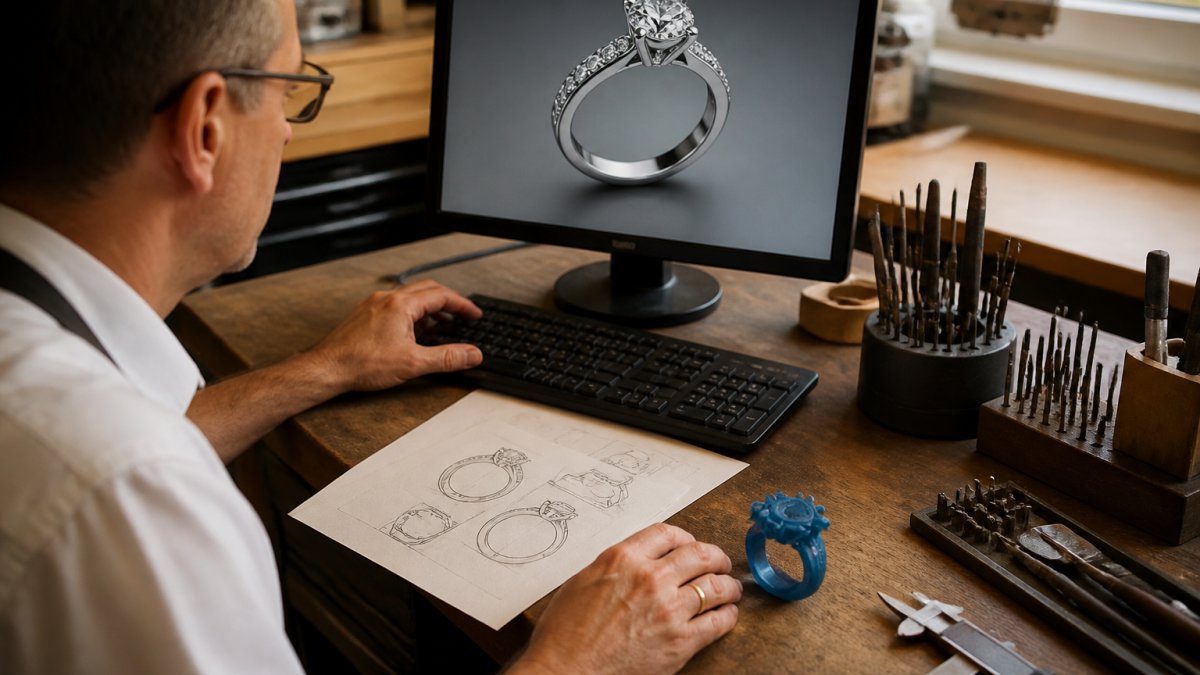
What the CAD workflow actually looks like
- Block model. The designer builds the basic volumes, band, shank, head, shoulders, to your agreed dimensions. Nothing decorative yet. You approve proportion and fit here, because changing them later means rebuilding the model.
- Detail pass. Settings, claws, milgrain, engraving channels and gallery work are added. This is where a design can suddenly look busier or heavier than the sketch suggested.
- Stone placement. Each stone is positioned and the setter checks that claws will actually hold it and that stones will not rub against each other. A render that ignores this is a picture, not a design.
- Render passes. The model is lit and rendered from multiple angles, top view, side profile, three-quarter view and a view on a modelled hand. Ask for all four; a single flattering angle hides problems.
- Revision rounds. Most jewellers include two or three rounds of changes. Confirm how many are included before you start, because additional rounds are commonly charged.
How to read a render like a jeweller
- Scale against the finger. Ask for the render on a hand at your ring size, not a generic hand. A 2.5 mm band looks very different on a size H than a size N.
- Metal colour under neutral light. Renders are often lit warmly, which makes white gold look brighter and rose gold pinker than it will in daylight.
- Claw count and thickness. Count the claws and ask for the wire diameter in millimetres. Thin claws look elegant in a render and wear through in a few years.
- Stone size relative to the setting. Ask for the stone's diameter in millimetres, not just carat weight, and compare it to the band width.
- Underside and gallery. Ask to see the view from below. This is where metal weight, comfort and cleaning access are decided, and it is the angle renders most often hide.
What file formats and outputs to expect
You will usually be shown a rendered image (PNG or JPEG) and, if you ask, a turntable video. The underlying CAD file is normally kept by the jeweller, but it is reasonable to ask whether a copy or an exported STL will be provided if you ever need the piece remade or repaired. Ask this before sign-off, not after.
From render to something you can hold
According to Jae's Jewelers on the design process, 3D renderings are now a cornerstone of design because they eliminate guesswork.
Step 4: Complete a Jewellery Design Brief Template Before Sign-Off
- Ring size confirmed on both hands, at room temperature
- Metal and purity stated, with colour reference
- Stone type, cut, carat and setting style listed
- Band width and profile in millimetres
- Engraving text, spelling and font checked
- Finish confirmed: polished, matte or brushed
- Deadline and collection date agreed in writing
- Total price and payment schedule signed off
See how the full bespoke engagement ring design process works from start to finish.
Thomas Sabo Charm necklace paperclip with Connect link silver →
AR, VR and DIY Tools: What Each Visualisation Method Costs You
Remote tools have changed the game, but they are not all equal, and most guides skip the two questions that matter: what does each method cost, and what can it not tell you? Here is a practical breakdown, including the AR and DIY options the standard CAD-versus-sketch advice ignores.
What each method costs and what it can and cannot show
| Method | Typical cost | Realism | What it is good for | What it cannot tell you |
|---|---|---|---|---|
| Hand sketches | Included in consultation | Low | Fast shape exploration, five or more options in an hour | Proportion on the hand, metal colour, stone sparkle |
| 3D CAD renders | Included, or a modest fee commonly in the £50-£250 range depending on complexity | High | Final design approval, checking claws and gallery | True sparkle, exact metal tone under daylight |
| AR try-on apps | Free to low cost; some retailer apps are free, premium apps often £5-£20 | Medium | Scale and colour on your own hand | Setting detail, underside, structural soundness |
| VR showrooms | Premium service, usually bundled into high-value commissions | High | Remote buyers who want a walk-around view | The feel of weight and comfort on the finger |
| DIY design software | Free to subscription, commonly £0-£30 a month | Low to medium | Rough concept testing before you approach a jeweller | Stone quality, structural soundness, manufacturability |
AR try-on: useful for scale, not for sign-off
Use AR to shortlist shapes before your consultation, not to approve a design.
VR showrooms: worth it only for remote, high-value commissions
Virtual reality goes further, letting you inspect a model in a simulated showroom and walk around it. For a buyer commissioning remotely, it closes some of the distance that a video call cannot. For a straightforward ring you can see in person, it adds little beyond cost.
DIY software for beginners: what to try before you talk to a jeweller
- General 3D modelling tools with free tiers are fine for blocking out band and stone shapes.
- Jewellery-specific design apps aimed at consumers offer ring and pendant templates with drag-and-drop stones.
- Simple 2D sketching apps on a tablet are often enough, a labelled sketch with millimetre notes beats a clumsy 3D model.
The cost-benefit rule of thumb
If you are weighing remote against in-person, our guide to remote bespoke ring design covers how the process works when you cannot visit.
Book a Visualisation Consultation at Morgan Banks
We also stock Thomas Sabo charm pieces, including the paperclip charm necklace in recycled silver at £135, if you want to start with something simpler.

Not sure what a bespoke designer actually does? Read what a bespoke jewellery designer does, or check how long custom jewellery takes to make before you commit.
Frequently Asked Questions
How can I visualise a custom jewellery design before it is made?
The process usually moves through four stages: reference gathering, hand sketches, a CAD render and a physical prototype. Each stage adds certainty. Sketches settle the overall shape, a 3D render shows proportion and stone placement from every angle, and a wax or resin model lets you hold the piece. Ask to see each stage and approve it in writing before the next begins. Skipping straight to production is where most disappointment comes from.
What is the difference between a jewellery sketch and a 3D render?
A sketch is a hand-drawn impression, useful for capturing mood, flow and rough proportion quickly. A 3D render is built in CAD software and shows exact dimensions, metal thickness, setting type and how light behaves on the stones. Sketches are cheap to change and encourage creative dialogue; renders are slower to produce but far more accurate. Most bespoke commissions use both, with the sketch first and the render as the final proof.
What should I include in a custom jewellery design brief template?
A useful brief records the piece type, ring size or chain length, metal choice, gemstone preferences, budget in pounds, deadline and any sentimental details you want reflected. Add reference photos and note what you dislike as clearly as what you like. Include your engraving text and any existing jewellery the new piece must sit alongside. A written brief reduces design iteration and gives you a document to check the final proof against.
Can I use reference photos to explain a bespoke jewellery idea?
Yes, and it is one of the fastest ways to close the gap between your idea and the jeweller's understanding. Bring photos of rings you have tried on, heirloom pieces, fabric textures or architecture whose lines you like. Mark up the images to show which element you want, such as the shoulder profile rather than the whole ring. Reference photos work best alongside a short written brief so the designer knows what to keep and what to change.
The gap between imagination and finished piece closes the moment you see a proper render. Get started with Morgan Banks and approve your design with confidence before a single stone is set.
